Introduction
Users switch between phones, tablets, and desktops every day. If a website fails to adapt to different screen sizes, visitors leave quickly. Responsive web design solves this problem by making websites flexible and easy to use on any device. For modern platforms like WebTechMyanmar that focus on web development, UI, and digital tools such as an animation maker, responsive design is not optional. It is a core requirement for performance, SEO, and user satisfaction.
This guide explains how responsive web design improves user experience on both mobile and desktop. You will also learn practical steps, definitions, and SEO insights relevant for developers, designers, and digital creators.
What Is Responsive Web Design?
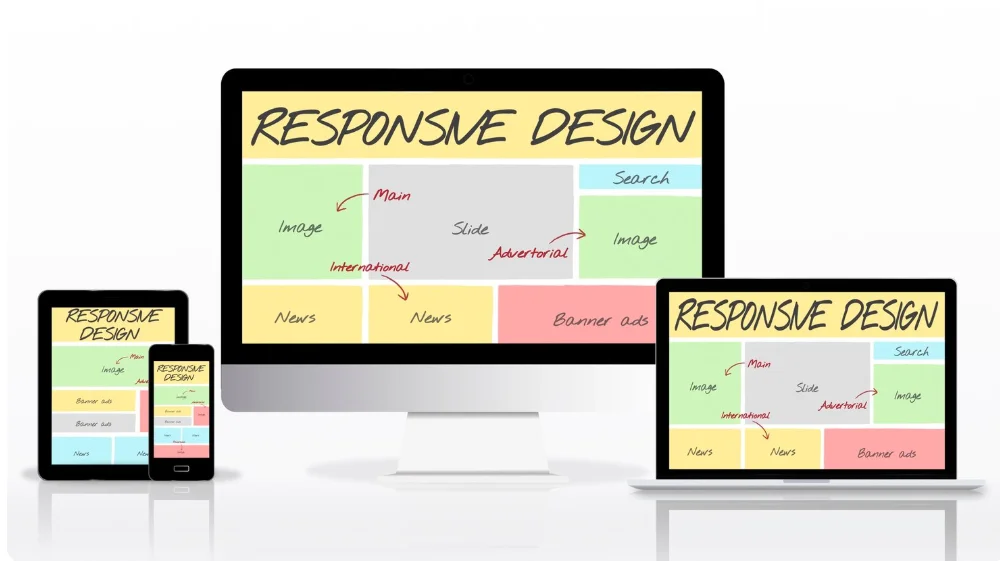
Responsive Web Design (RWD) is a design approach that allows a website layout to automatically adjust based on screen size, resolution, and device orientation.
Instead of creating separate websites for mobile and desktop, developers use flexible grids, fluid images, and CSS media queries to ensure the same website works everywhere. This method reduces development complexity and improves consistency across devices.
According to Google’s official documentation on mobile-first indexing, Google primarily uses the mobile version of a site for ranking and indexing. This means responsive design directly affects SEO performance.
Responsive design includes three main components:
- Fluid grids: Layouts use percentage-based widths instead of fixed pixels.
- Flexible images: Images scale within their containing elements.
- Media queries: CSS rules apply different styles based on device screen size.
When websites adopt these principles, users experience smooth navigation whether they browse from a smartphone in Yangon or a desktop at work.
Key takeaway: Responsive web design ensures one website adapts seamlessly to all devices, improving usability and search visibility.
How Responsive Design Improves Mobile User Experience
Mobile traffic dominates global internet usage. According to Statista, mobile devices account for over half of global web traffic. If a website does not perform well on mobile, it risks losing the majority of its audience.
1. Faster Loading Times
Responsive websites optimize images, layouts, and scripts for smaller screens. Faster loading speeds reduce bounce rates and improve engagement.
Google research shows that 53 percent of mobile users leave a site if it takes longer than three seconds to load. Speed directly affects user satisfaction and conversions.
2. Easier Navigation
On mobile screens, space is limited. Responsive design simplifies navigation using:
- Collapsible menus
- Touch-friendly buttons
- Clear typography
- Proper spacing between elements
Users can tap, scroll, and interact without frustration.
3. Better Readability
Responsive websites adjust font sizes and line spacing based on screen size. Text remains clear without forcing users to zoom in or scroll horizontally.
For example, a tutorial on how to use an animation maker tool should display clean headings, readable instructions, and properly scaled images on small screens.
Key takeaway: Responsive design improves speed, readability, and navigation on mobile, reducing bounce rates and increasing engagement.
How Responsive Design Enhances Desktop Experience
Many people think responsive design only benefits mobile users. That is not true. Desktop users also gain major advantages.
1. Consistent User Interface
Users expect consistency across devices. When someone visits a website on mobile and later switches to desktop, the layout and branding should feel familiar.
Responsive design maintains consistent colors, typography, and structure. This builds trust and brand recognition.
2. Better Use of Screen Space
On larger screens, responsive layouts expand content sections, add multi-column structures, and display more information without clutter.
For example:
- A blog post can show related articles in a sidebar.
- A development tutorial can include code snippets and previews side by side.
- A web tool such as an animation maker can display editing panels and preview windows efficiently.
3. Improved Accessibility
Responsive design often aligns with accessibility best practices, including scalable text and structured content hierarchy. According to the World Wide Web Consortium (W3C), accessibility improves usability for everyone, not just users with disabilities.
Key takeaway: Responsive design enhances desktop layouts by improving consistency, usability, and efficient content presentation.
Why Responsive Web Design Matters for SEO
Search engines prioritize mobile-friendly websites. Google’s mobile-first indexing means your mobile version determines your rankings.
Direct SEO Benefits
- Lower bounce rates
- Faster loading times
- Better user engagement
- Reduced duplicate content issues
- Easier crawling and indexing
If WebTechMyanmar publishes tutorials on web development trends or UI tools, responsive formatting ensures that search engines understand and rank the content properly.
For more insights into improving search performance, you can explore Google’s Mobile-Friendly Test tool and documentation.
Reduced Maintenance
Instead of managing separate mobile and desktop versions, responsive design uses one codebase. This reduces errors and technical issues that could harm SEO.
Key takeaway: Responsive design supports mobile-first indexing, improves engagement metrics, and strengthens overall SEO performance.
How Responsive Design Supports Interactive Tools Like Animation Maker Platforms
Modern websites often include interactive features such as editors, builders, or animation tools. These tools must function smoothly on all devices.
An animation maker platform requires:
- Drag-and-drop interfaces
- Preview panels
- Timeline controls
- Media uploads
If the layout does not adjust properly, users struggle to interact with these elements on smaller screens.
Responsive design helps by:
- Stacking panels vertically on mobile
- Expanding toolbars on desktop
- Adjusting control sizes for touch input
- Optimizing media previews for different resolutions
This flexibility ensures that creators can design animations on a tablet, edit on a laptop, and review on a phone without usability issues.
Key takeaway: Responsive design enables complex tools like animation platforms to remain functional and intuitive across devices.
Practical Steps to Implement Responsive Web Design
If you manage or contribute to a website like webtechmyanmar.com, here are actionable steps to improve responsiveness:
Step 1: Use a Mobile-First Approach
Design for small screens first. Then progressively enhance the layout for larger devices.
Step 2: Apply Flexible Grids
Use percentage-based widths instead of fixed pixel layouts.
Example:
- Instead of width: 800px
- Use width: 100%
Step 3: Optimize Images
- Use modern formats like WebP
- Enable lazy loading
- Compress images without losing quality
Step 4: Use CSS Media Queries
Define breakpoints such as:
- 768px for tablets
- 1024px for desktops
Step 5: Test on Real Devices
Use tools such as:
- Google Mobile-Friendly Test
- Chrome DevTools device simulator
Also manually test navigation, forms, and interactive features.
Step 6: Monitor Performance Metrics
Track:
- Bounce rate
- Average session duration
- Core Web Vitals
These indicators show whether users enjoy the experience.
Key takeaway: A mobile-first strategy, flexible grids, optimized images, and continuous testing are essential for effective responsive design.
Common Mistakes to Avoid in Responsive Design
Even experienced developers make mistakes. Avoid these common issues:
- Ignoring performance optimization
- Using too many large images
- Not testing on multiple devices
- Overloading mobile layouts with desktop elements
- Forgetting touch-friendly spacing
Responsive design is not only about shrinking layouts. It requires thoughtful restructuring of content and interactions.
Key takeaway: Effective responsive design requires strategic layout planning, not simple resizing.
Frequently Asked Questions
1. Why is responsive web design important for SEO?
Responsive web design supports mobile-first indexing and improves user engagement metrics like bounce rate and session duration, which influence search rankings.
Key takeaway: Responsive design directly strengthens SEO performance through better mobile optimization.
2. Does responsive design affect website speed?
Yes. Properly implemented responsive design optimizes images and layout rendering, which improves loading speed across devices.
Key takeaway: Faster loading times from responsive design reduce user drop-offs.
3. Is responsive design better than having a separate mobile site?
In most cases, yes. A single responsive website is easier to manage, avoids duplicate content issues, and provides consistent user experience.
Key takeaway: One responsive site is more efficient and SEO-friendly than separate mobile and desktop versions.
4. Can complex tools like an animation maker work on mobile?
Yes, if the interface adapts using responsive techniques such as stacked layouts and touch-friendly controls.
Key takeaway: Responsive design makes interactive tools usable across all devices.
Conclusion
Responsive web design improves user experience by ensuring speed, clarity, and consistency across devices. It supports mobile-first indexing, strengthens SEO, and enables complex digital tools to function properly. For technology-focused platforms like WebTechMyanmar, responsive design is a strategic foundation rather than a design trend.
Web users expect smooth navigation whether they read tutorials, explore development resources, or use an animation maker tool. When websites adapt intelligently to every screen size, they build trust, improve rankings, and increase engagement.
Final takeaway: Responsive web design enhances usability, SEO, and functionality on both mobile and desktop, making it essential for modern web platforms and interactive tools.